Visuals that speak louder than words.
The Cetra interactive whiteboard and text customisation tools are built to help MSK professionals communicate more clearly, educate more effectively, and create stronger patient understanding during every consultation.
Adapt handout content to suit your clinical approach and communication style.
Adjust terminology, refine explanations, and add your own notes or treatment preferences. Once customised, save your version to your personal or clinic workspace so it’s ready to reuse whenever you need it. Create it once. Use it across unlimited sessions.
Visualise with the interactive whiteboard
Transform explanations into clear, visual learning moments. Draw directly onto diagrams, highlight key structures, add labels, and guide patients through their condition or injury in real time. Visual annotation helps patients grasp complex anatomy faster, retain information better, and feel more confident about their treatment plan, all while keeping consultations efficient and engaging.
Whether you’re explaining a rotator cuff injury, demonstrating movement mechanics, outlining a rehab pathway, or reviewing post-injury anatomy, Cetra’s customisation tools will help you.

Search
Find the exact patient information sheet or anatomy diagram you need in seconds. Spend less time searching and more time caring for your patients.
Personalise
Create once, use anytime. Customising our patient information sheets and anatomy diagrams upfront saves time in consultations.
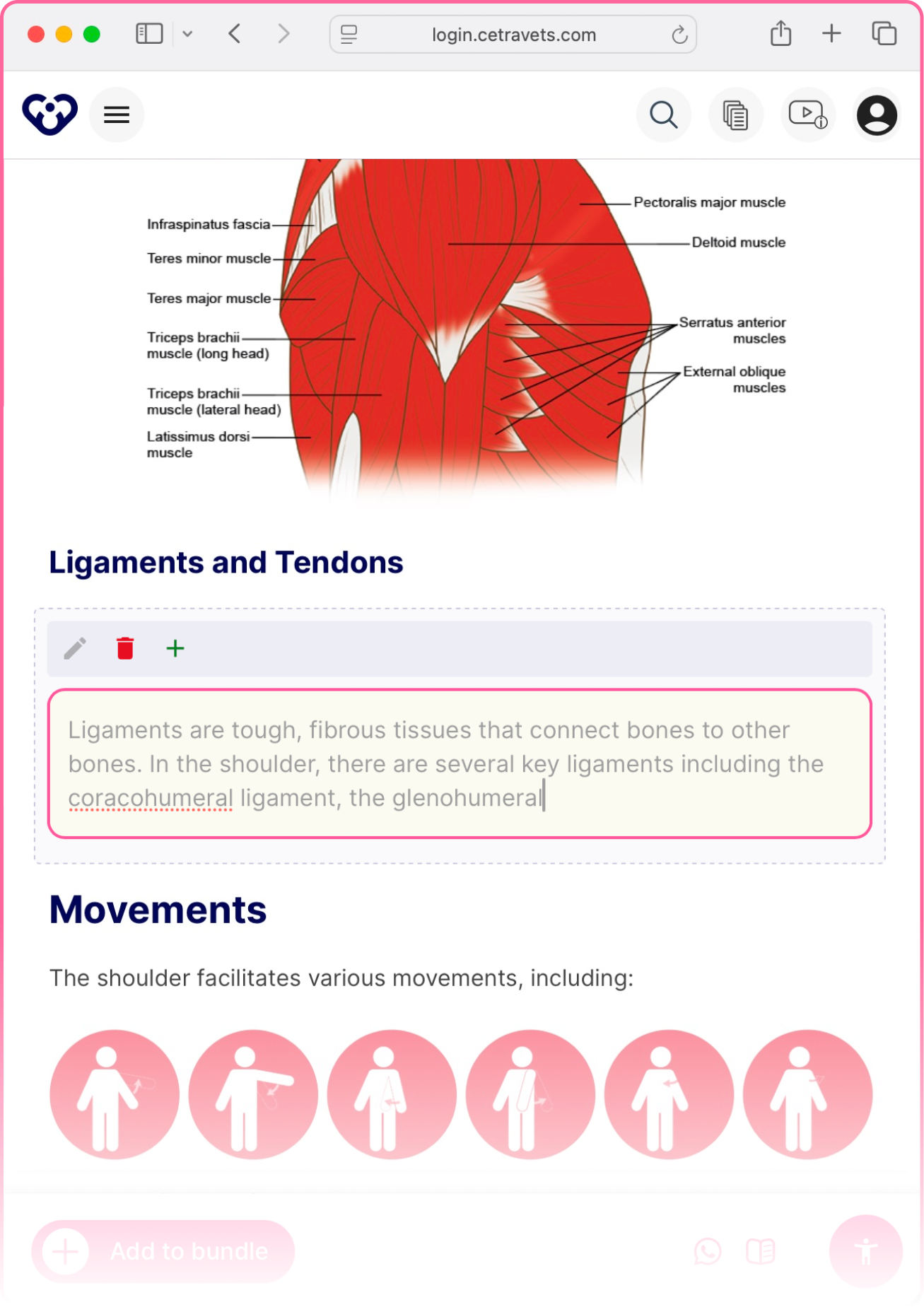
Annotate
Mark up illustrations in real time to clearly explain diagnoses, treatments, and procedures. Visual clarity helps patients understand faster and feel more confident in their decisions.

Share
Share information the way your patients prefer, whether digital or printed. Easy access leads to better understanding and stronger compliance.

Draw the connection between anatomy and recovery.
Ways to use Cetra Health in your practice.

Bring anatomy and injuries to life during consultations with our library of detailed, anatomically accurate visuals. Edit text and use the Whiteboard to sketch, annotate, and highlight directly on illustrations.

Draw attention to the exact muscles, joints, or structures involved in a patient’s condition. Use text edits and the Whiteboard to highlight specific areas so patients can clearly see what’s affected and understand the focus of their treatment plan.

Tailor every consultation by adding your own annotations and text notes directly onto our patient information sheets. From exercise reminders to rehab milestones, personalised updates help to keep a patients progress documented.

Save your customised patient information sheets (text edits and whiteboard annotations) under personal or clinic workspaces, with different levels of access for your team. Keep everything organised, secure, and easy to revisit.

Track changes to an injury or condition over time with side-by-side visuals. Use text edits and the Whiteboard to document progress, helping patients see improvements, stay motivated, and stick to treatment plans.

Share annotated visuals and information sheets with patients via print, WhatsApp, text, or email. Edit text and use the Whiteboard, then share with one click to keep patients informed and engaged between appointments.
Why users love Cetra Health!
-
![Amy Flory Cetra Health Testimonial]()
Throughout my career, I have found that the patient’s understanding of their condition is pivotal in their outlook – a better understanding always leads to better outcomes! The evidence-based handouts (by Cetra) are fantastic at demystifying complex conditions and placing the power back in the patients' hands, by providing accurate information in an easy-to-understand way.
Amy Flory
Specialist Occupational Health Physiotherapist
NHS -
![]()
It is of extreme importance that people are provided with information regarding suspected or diagnosed conditions they are experiencing. In a time-limited world, being able to provide a written resource for them to refer back to that is detailed, relevant and easy to absorb is a vital component of a consultation. Cetra provides access to such resources and this will undoubtedly enhance healthcare interactions.
Jack March
Specialist Rheumatology Physiotherapist
Rheumatology.physio


Trusted by professionals, new graduates and universities worldwide.